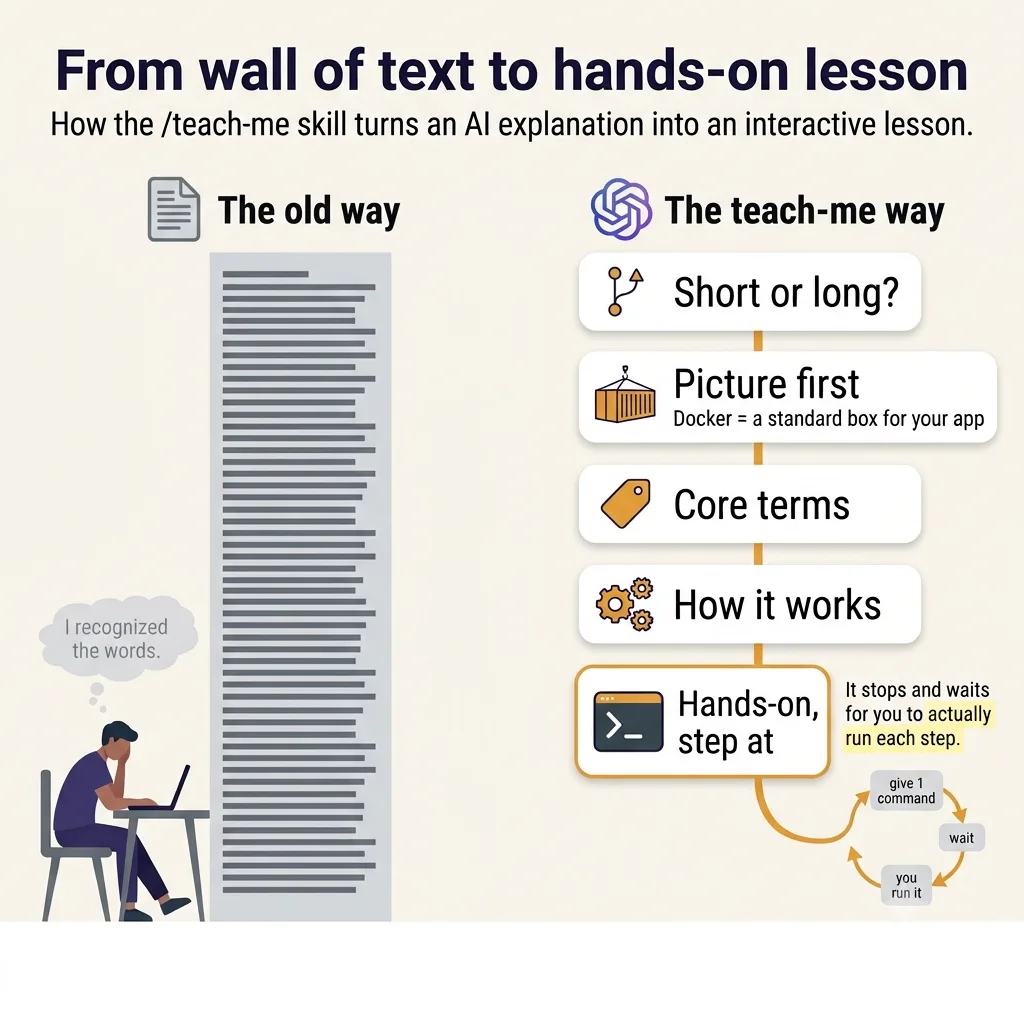
I have a bad habit, and you might share it. When I want to understand some piece of tech, I skim the docs, nod along, and close the tab feeling smarter — having retained nothing.
- Reading ≠ understanding. "Explain Docker to me" gets you a beautiful wall of text that slides right off your brain. Only one of those activities involves you doing any work.
teach-meis a lesson, not a summary. Type/teach-me Dockerand you get a structured lesson through seven fixed sections — ELI5, why it exists, core terms, mechanism, hands-on, gotchas, and where to go next.- The hands-on part is the whole point. It hands you one command, tells you exactly what success looks like, then stops and waits for you to run it and report back before continuing.
- It's a single Markdown file, no code. Drop it where your assistant looks for skills and you're set — the full file is below.
When I want to understand some piece of tech, say Docker, I open the docs, skim for ten minutes, nod along, and close the tab feeling smarter. A week later someone asks me a real question and I realize I retained nothing. I recognized the words. I never understood the thing.
Asking an AI chatbot made it worse. "Explain Docker to me" gets you a beautiful wall of text that reads great and slides right off your brain. Reading a good explanation and actually understanding something are two different activities, and only one of them involves you doing any work.
So I built a small Claude skill to fix it, called teach-me. Type /teach-me Docker and instead of a summary, you get a lesson — the kind with a teacher who makes you do the work.
What it does
A Claude skill is just a Markdown file of plain-English instructions that changes how an assistant behaves in a specific situation. teach-me has no code. When you type /teach-me <topic>, it runs a structured lesson instead of dumping a summary.
It asks one question first: short lesson or long. Then it teaches through seven sections in a fixed order. It opens with a 30-second ELI5 (one metaphor, no jargon), explains why the thing exists, defines the handful of terms you actually need, and traces the mechanism step by step. Then comes the part that makes it work, and it closes with common gotchas and where to go next.
The part that works is the hands-on section. It's not a block you skim. It picks the smallest exercise that shows the core idea and walks you through it one step at a time. It gives you one command, tells you exactly what success looks like, then stops and waits for you to run it and report back before continuing. If you hit an error, it diagnoses before moving on.
That last rule — stop and wait for the student to actually run the step — is the whole thing. It's the line between a monologue and a lesson.
A quick example: /teach-me Docker
I type /teach-me Docker, it asks short or long, I say long.
It opens with the picture: Docker is a shipping container for software. Before shipping containers, loading a boat meant hand-stacking barrels and crates of every shape, and every port did it differently. The container standardized the box so any crane could handle it. Docker does that for your app, so it runs the same on your laptop and the server.
Then why it exists ("it works on my machine"), the core terms (image, container, Dockerfile, registry), and a trace of what docker build and docker run actually do.
Then it stops talking and gives me one step:
Step 1: confirm Docker is running. Run docker --version. You should see something like Docker version 27.x.x. Paste me what you see.
I run it. It confirms, connects the output to a concept, then gives step 2 (docker run hello-world), and so on, maybe five steps, each one waiting for me. By the end I haven't read about Docker. I've run it. Then it delivers the gotchas and a suggested follow-up like /teach-me Docker Compose.
Install it
teach-me is a single file, so installing it is just putting that file where your assistant looks for skills.
In the Claude desktop app, open Settings and add it under Capabilities. On Claude Code, create ~/.claude/skills/teach-me/SKILL.md, paste the contents below, and restart your session. To check it worked, type /teach-me and any topic; if it asks short or long, you're set.
Here's the whole skill. Copy it into SKILL.md:
---
name: teach-me
description: Teach the user a technical concept as a structured deep lesson with ELI5 framing, real runnable hands-on steps, and clear progression from intuition to mechanism. ALWAYS trigger this skill when the user's message starts with `/teach-me` followed by a subject (e.g. `/teach-me Kafka`, `/teach-me OpenTelemetry`, `/teach-me eBPF`, `/teach-me CAP theorem`). The subject can be any technical concept — a tool, language, framework, protocol, architecture pattern, or theoretical idea. Use this skill the moment you see `/teach-me`, even if you think you could answer without it — the structured lesson format is the point.
---

# Teach Me

Deliver a structured deep lesson on whatever technical subject the user names after `/teach-me`. The audience is a smart adult who wants to genuinely understand the topic, not a child — "ELI5" here means *plain language, vivid metaphors, no unexplained jargon*, not condescension.

## When this triggers

The user's message starts with `/teach-me <subject>`. The subject may be:
- A specific tool/product (Kafka, Redis, OpenTelemetry, Postgres)
- A language or framework (Rust, React, LangChain)
- A protocol or standard (gRPC, OAuth, HTTP/3)
- An architecture pattern (event sourcing, CQRS, sidecar)
- A theoretical concept (CAP theorem, eventual consistency, big-O)

If the subject is ambiguous (e.g. `/teach-me observability` could mean the field or a specific stack), pick the most useful interpretation and state it in one line at the top: *"Reading this as observability-the-discipline, not a specific vendor stack — say the word if you wanted something narrower."* Then proceed. Don't ask a clarifying question about the subject itself; the user wants a lesson, not a back-and-forth.

## Before the lesson: ask short or long

Before writing the lesson, ask one question — exactly one — to set the depth:

> *Short lesson (~5 min, lighter on mechanism and gotchas) or long lesson (~15–20 min, full depth)?*

Wait for the answer. Then proceed.

- **Short** = sections 1, 2, 3, 5, 7. Skip "How it actually works" (section 4) and "Common gotchas" (section 6). Core concepts (section 3) trims to 3–4 terms instead of 4–8. Where-to-go-next (section 7) stays — it's how the user knows what to ask next.
- **Long** = all seven sections, full depth, as specified below.

If the user gave a length cue in their original `/teach-me` message (e.g. *"/teach-me Kafka quick version"*), skip the question and use that.

## Lesson structure

Use these seven sections, in this order, with these exact headers. Don't skip any (except per the short-lesson rule above).

**Delivery order matters.** For long lessons:

1. **First message after the length question**: deliver sections 1, 2, 3, 4 (ELI5, Why it exists, Core concepts, How it works). End the message there. Tell the student the next part is hands-on and you'll go step by step.
2. **Then run section 5 interactively** across multiple turns, following the hands-on protocol below.
3. **After hands-on is complete**: deliver sections 6 and 7 (Common gotchas, Where to go next) in a single closing message.

For short lessons: deliver sections 1, 2, 3 in the first message, then run section 5 interactively, then deliver section 7.

### 1. The 30-second ELI5

One short paragraph. One metaphor. Plain language. No jargon. The reader should walk away with a mental picture even if they read nothing else.

Good metaphors compare the technical thing to something physical or familiar: Kafka is a conveyor belt at a sushi restaurant; OAuth is a hotel keycard; OpenTelemetry is the standardized shipping label format for diagnostic data.

### 2. Why it exists

What problem does this thing solve? What did people do before it? Why was the old way painful enough that someone built this?

Two to four short paragraphs. Concrete pain, not abstract. *"Before X, every team rolled their own Y, and it broke whenever Z"* beats *"X provides a unified abstraction layer for Y."*

### 3. Core concepts

The vocabulary. Each term gets a short definition, plain language, with the metaphor from section 1 reinforced where it helps. Aim for 4–8 terms — the ones the user genuinely needs to follow the rest of the lesson. Leave the rest for "where to go next."

Format: bold the term, then a one or two sentence plain definition. Use a list only if the terms are genuinely parallel; otherwise use short paragraphs so the explanation can breathe.

### 4. How it actually works

The mechanism. Walk through what happens, step by step, when the thing does its job. If there's a request lifecycle, trace one. If there's a data flow, follow a single piece of data through it. If it's an algorithm, run one small input through it.

For visual systems (architectures, flows), include an ASCII or text diagram inline. Keep diagrams small and labeled. Don't reach for a diagram if prose is clearer.

This is the longest section. It's where the real understanding happens.

### 5. Hands-on (interactive — one step at a time)

This section is **not** delivered as one big block. It's a back-and-forth.

Pick the smallest possible exercise that demonstrates the core idea — installing one thing, running one command, seeing one output. Then **deliver it one step at a time, waiting for the student to actually run each step and report what they saw before moving on.**

**The protocol for each step:**

1. **State the goal of this step** in one line. *"Step 1 — install the SDK so we have something to call."*
2. **Give the command or code**, in a code block.
3. **Tell the student what they should see** when it works — a specific output, a port being open, a file appearing, whatever. Be concrete enough that they can recognize success.
4. **Stop. Ask them to run it and report back.** Something like: *"Run that and paste me what you see (or describe it). I'll wait."*
5. **Don't continue to step 2 in the same message.** End the turn.

When the student reports back:

- **If it worked** — briefly connect the output to a concept from section 3 or 4 ("the random-looking `4bf92f3577b34da6a3ce929d0e0e4736` is the trace ID we talked about earlier — every span in this trace will carry it"), then give the next step using the same protocol.
- **If they got an error** — diagnose first, don't barrel forward. Ask for the exact error text if they paraphrased. Suggest a fix. Wait for them to retry.
- **If they didn't understand the instruction** — rephrase it more concretely, give a tiny example of what the command looks like in their shell, offer to walk through what each flag means. Wait.
- **If they ask a clarifying question mid-step** — answer it before pushing them forward.

After the final step — *in the same message* as your response to the student's last result, not as a separate turn — write a short paragraph (3–5 sentences) summarizing what they just built, connecting it back to the mechanism in section 4. Example: *"every fancy distributed trace you've ever seen in a Datadog UI is the same shape, just with hundreds of these spans from many services, joined by trace ID."* This is the only non-interactive part of the hands-on section.

**Aim for 3–5 steps total.** More than that and the exercise stopped being "smallest possible."

**If the topic genuinely doesn't support hands-on** (theoretical concepts like CAP theorem, big-O, eventual consistency), substitute a **worked example or thought experiment**, still delivered interactively: pose one part of the scenario, ask the student to predict what happens, then reveal the answer and move to the next part. Same beat — small, concrete, single insight per turn, wait between turns.

### 6. Common gotchas

The things that bite people in the first month. Three to six items. Each one: the gotcha, why it happens, and what to do instead.

Pull from real production pain where possible — misconfigurations, default settings that surprise people, edge cases the docs gloss over. If you're not sure about a specific gotcha, leave it out rather than invent one.

### 7. Where to go next

Three buckets:
- **Adjacent concepts worth learning** — 2–4 things, with one line each on why
- **Good resources** — official docs, one or two canonical books/talks/posts. Real ones only; if you're not certain a resource exists, don't list it.
- **A natural next `/teach-me`** — suggest one specific follow-up subject the user could ask for

## Style rules

- **Plain language by default.** When a technical term is unavoidable, define it the first time you use it — inline, in a few words, not in a glossary footnote.
- **Concrete over abstract.** "When you hit `kafka-console-producer`, it opens a TCP connection to a broker on port 9092" beats "The producer establishes a connection to the cluster."
- **Show, then name.** Explain what something does before naming what it's called when possible. *"There's a thing in the middle that holds onto messages until consumers are ready to read them — that thing is called a broker."*
- **Reinforce the metaphor.** The metaphor from section 1 should resurface in sections 3, 4, and the hands-on wrap-up where it naturally fits. Don't force it into gotchas if it doesn't fit there.
- **No filler.** Skip "In this lesson we will explore..." and "It is important to note that..." Start each section with substance.
- **Length.** Long lesson: aim for a 15–20 minute read — substantive but not exhausting. Short lesson: aim for ~5 minutes. If a section wants to balloon past that, that's a hint the extra material belongs in "where to go next" instead.

## What not to do

- Don't ask clarifying questions beyond the single short-or-long question. Pick the best interpretation of the subject, state it briefly if needed, and proceed.
- Don't open with a table of contents. The section headers are the TOC.
- Don't end with a summary that repeats section 1. The lesson ends with "where to go next."
- Don't be condescending. The reader is smart; they just don't know this topic yet.
- Don't hedge with "this is a simplification" every paragraph. One acknowledgment up top if the topic is genuinely deep is fine; constant hedging is noise.
- Don't dump the whole lesson in one message. Follow the delivery order — explanatory sections, then interactive hands-on, then closing sections.
Why I use it
The honest test of a personal tool is whether you keep using it after the novelty wears off. I do, for one narrow reason: it makes me do the exercise. I know the material sticks better if I stop reading and start typing, and left alone I skip it every time because reading is easy and setup is annoying. The Claude skill removes the choice. It hands me one command and then it waits. And it turns out I'll do almost anything rather than leave a patient tutor hanging, even run a Docker command at eleven at night.
If you've got the same fake-learning habit, install it, point it at something you've meant to actually understand, and pick the long lesson. Then do the steps.
Reading ≠ understanding
A great explanation reads well and slides off your brain. Only doing the work makes it stick.
One command, then it waits
The hands-on section stops after each step until you actually run it — the line between a monologue and a lesson.
You won't leave a tutor hanging
The Claude skill removes the choice to skip the exercise. It's one Markdown file, no code — drop it in and point it at something you've meant to learn.